
ProPresenter is live presentation and production software made by Renewed Vision for macOS and Windows. It is designed for situations where an operator needs to change what appears on one or more screens in real time: song lyrics, scripture, sermon points, videos, timers, stage cues, lower thirds and other visual content.
The important distinction is the word live. A conventional slide deck is usually prepared as a fixed sequence. ProPresenter is built around an operator who may need to jump to another slide, repeat a chorus, change a running order or send different information to the audience and the people on stage without exposing the control interface.
What ProPresenter does
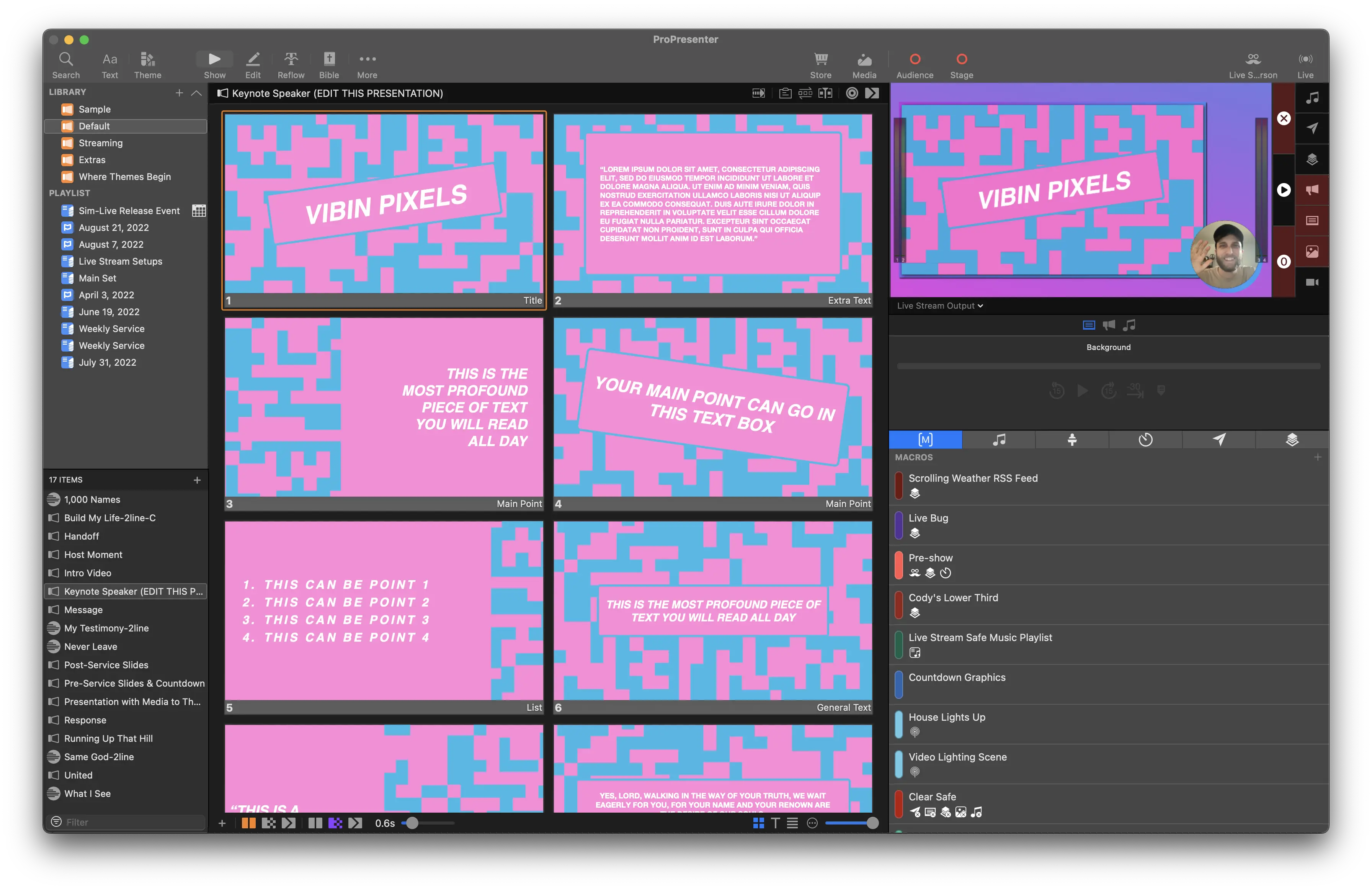
A typical setup has a production computer running ProPresenter and one or more outputs connected to displays, projectors, LED processors, capture hardware or network video workflows. Inside the application, presentations and media are organized so the operator can trigger them during an event.
- Audience output: the content intended for the room, such as lyrics, slides or video.
- Stage display: a separate confidence view that can show current and next content, clocks, notes or other cues for people on stage.
- Additional outputs: depending on the system and configuration, teams can create separate feeds for overflow rooms, streaming or other destinations.
- Media playback: images and video can be integrated with slide content rather than launched from a separate player.
Renewed Vision documents the current screen-configuration workflow in its support center. Our multi-screen and stage display guide explains how to approach the operating system, ProPresenter and the physical signal chain separately.
Why churches use it
Church services are a natural fit because the order can change while the event is already in progress. Lyrics may repeat, a speaker may move to a different passage, or a video may be skipped. ProPresenter lets the operator respond without rebuilding the presentation in front of the audience.
The same model can also be useful for schools, conferences, live events and other venues where a presentation is actively operated rather than simply played from beginning to end.
How it differs from PowerPoint or Keynote
PowerPoint and Keynote are general presentation tools. They can be excellent for prepared talks, but ProPresenter is built around live production needs: separate audience and stage views, reusable media and presentation libraries, real-time changes and multiple output destinations. That does not make it the right tool for every presentation; it makes it more specialized.
Simple rule of thumb
If one presenter controls one deck on one screen, a normal slide tool may be enough. If an operator controls changing content across audience, stage and production outputs, ProPresenter becomes much more relevant.
Does ProPresenter work on Mac and Windows?
Yes. Renewed Vision publishes current builds for both platforms. Minimum operating-system support changes over time, so do not buy hardware from an old checklist. Check our current system requirements guide and then verify the vendor page before making a purchase decision.
Performance also depends on the workload, not just the operating system. Total output pixels, media resolution and video compression are among the factors Renewed Vision calls out in its current requirements guidance.
Is ProPresenter free?
The installer can be downloaded before purchase and the application can be explored in a watermarked state. Renewed Vision also offers a time-limited fully registered trial. Ongoing clean production output for new customers uses the vendor's current subscription model. Pricing and terms can change, so our trial, pricing and subscription guide links directly to the current vendor information rather than hard-coding an old price.
Which version should you use?
For a new installation, use the current stable release published by Renewed Vision unless a documented legacy workflow requires an older build. The vendor's download page provides current and previous versions and release notes. ProPresenter 7 remains an important legacy generation, but it is not the current release line in 2026.
Where should you download ProPresenter?
Download it from Renewed Vision. ProPresenter7.com is an independent guide site and does not host, mirror or repackage the installer. The button on our homepage opens the vendor download page directly.
That separation is intentional: the vendor is the source for signed installers, version history, licensing, account management and official technical support. This site focuses on explaining the workflow and helping readers find the right official source.
Who should consider it?
ProPresenter is worth evaluating when your setup needs live operator control, more than one type of output, reusable lyrics or media, or stage information that must differ from what the audience sees. If your needs are simpler, test the workflow before committing to a subscription or new hardware. A realistic rehearsal tells you more than a feature list.
Next, read the download and installation guide, or browse the guide library for screens, performance, licensing and troubleshooting.
Sources checked
Time-sensitive product facts on this page are checked against Renewed Vision, the developer of ProPresenter.
- Renewed Vision — ProPresenter product overview
- Renewed Vision — current and previous versions
- Renewed Vision — screen configuration
Last source review: 14 October 2026. Product names and features belong to Renewed Vision; ProPresenter7.com is independent.
Want the current installer?
Use our download section to go straight to the official Renewed Vision page.